Last updated Oct 27, 2026
review · Published-source research

Logitech MX Master 3S Review: A Better Fit for Your Desk?

A source-based look at its scrolling controls, software requirements and buying tradeoffs—with the important differences between retail editions.

Paid link. As an Amazon Associate I earn from qualifying purchases. By . Not a hands-on test; manufacturer claims are attributed.
The short verdict

Choose it if…

  • Right-handed users
  • You want a main wheel plus a separate thumb wheel
  • You can install Logi Options+ on Windows or macOS

Skip it if…

  • You need a left-handed mouse
  • Your work computer blocks software installs
  • The offer must include a receiver (listing is contradictory)
Read the full verdict
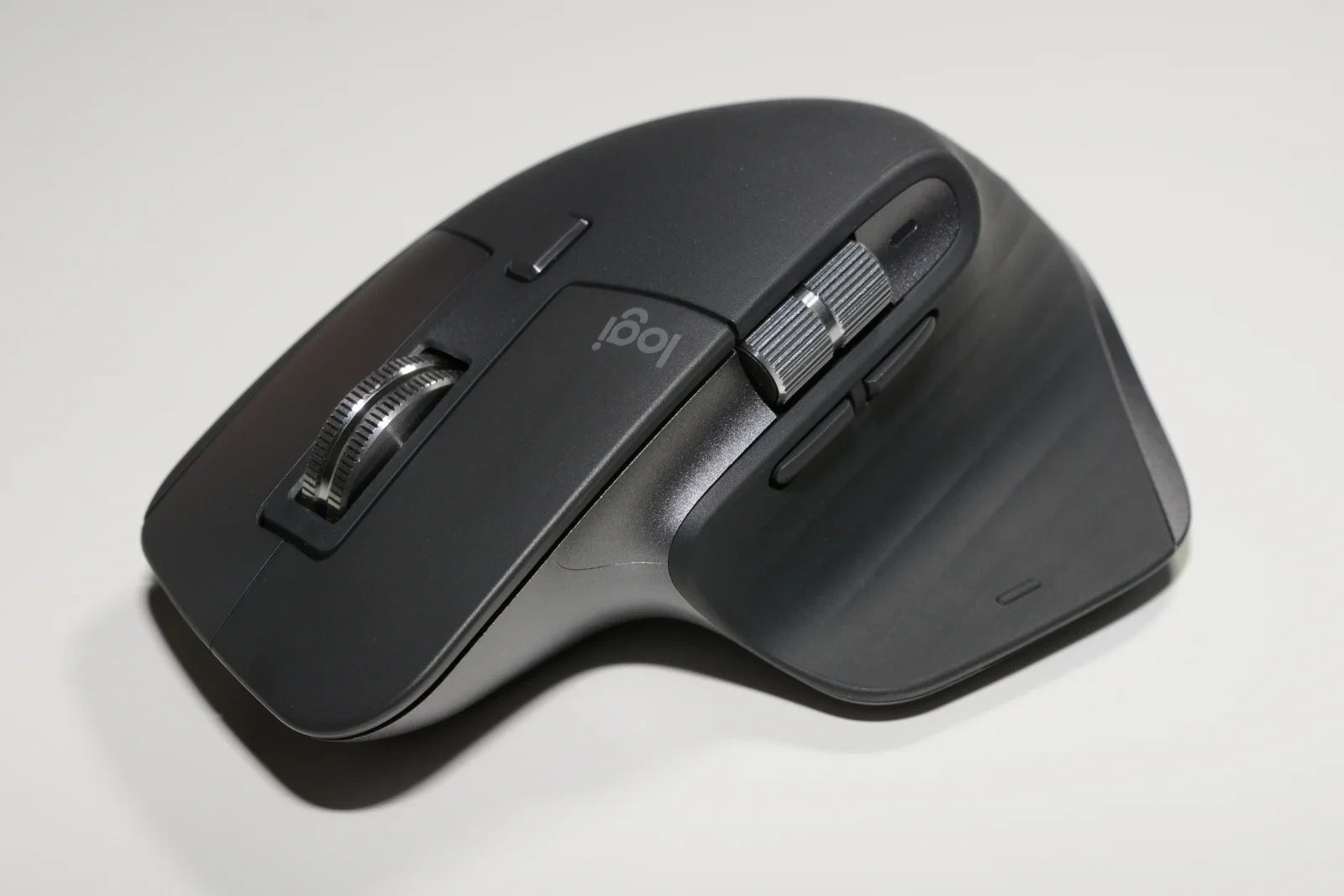
Logitech MX Master 3S photographed from above, showing its main scroll wheel, thumb wheel and sculpted thumb rest.
Photo: Hayden Schiff / Wikimedia Commons, CC BY 4.0. Resized and converted to WebP; source and license linked in Sources & references. Independently sourced photo, not an ApexTrusted test unit.
Quick fit check

Find out if it fits your setup

Pick your answers. Each result is written from the sources cited in this review; it is not a personal assessment or a guarantee.

Dominant hand
Software
Connection
Matches the documented fit
  • The MX Master 3S is a right-handed design.
  • Full customization uses Logi Options+, which Logitech lists for Windows and macOS.
  • Logitech's US store sells the 3S as a Bluetooth Edition.
See price & availability on Amazon Paid link. As an Amazon Associate I earn from qualifying purchases.
Worth a closer look?

The short verdict

Shortlist MX Master 3S for right-handed desk work if its main wheel, thumb wheel and configurable controls solve tasks you do often.

Check hand fit, software permissions and the exact receiver contents before ordering. Keep your current mouse if extra controls would not improve your routine.

Why this verdict

Shortlist it for a permanent desk where you spend time in spreadsheets, long documents or editing applications and want more control under one hand. Logitech documents a main MagSpeed wheel, a separate thumb wheel and configuration through Logi Options+. Those features make a more persuasive case for office work than maximum sensitivity alone.

Skip the upgrade if your current mouse already handles your routine comfortably. Extra controls only earn their place when you use them. If you cannot install configuration software, place less value on app shortcuts; if you carry a mouse daily, compare the packed size against a compact model. These are buying judgments, not measured performance results.

See price & availability on Amazon Paid link. As an Amazon Associate I earn from qualifying purchases.
  • 8,000 DPIMaximum sensor resolution (Logitech)
  • 141 gWeight (Logitech datasheet)
  • 2Scroll wheels: main and thumb
  • 4 mmMinimum glass thickness for tracking (Logitech)
A closer look

What matters before you buy

What makes it useful

A substantial right-handed mouse with a thumb shelf and side controls. Check hand fit and carrying space; a sculpted shell is not proof of comfort.

Read full analysis

Logitech's MX Master 3S for Business datasheet lists a right-handed design, a weight of 141 g and dimensions of 124.9 × 84.3 × 51 mm. That business document is a useful physical reference, but its commercial warranty and package contents should not be assumed to apply to a consumer Amazon offer.

The photographed thumb shelf and side controls explain why handedness matters. A left-handed buyer should choose a design intended for their hand rather than adapt to this one. Hand size, grip and desk height are personal variables: a sculpted shell is not proof of comfort or a treatment for wrist pain. Try the shape in a store where possible, or confirm the seller's return terms before opening the box.

Logitech specifies an 8,000-DPI sensor and glass tracking with a minimum glass thickness of 4 mm. Treat those as manufacturer specifications. A bigger DPI number does not establish better cursor control for your particular setup.
View source details

Will it work for you?

Options+ enables customization on supported systems. Check workplace permissions and the exact receiver contents: the linked listing contains conflicting receiver information.

Read full analysis

Check the software path before buying. Logitech states that Options+ is available for Windows and macOS and supports button assignments and app-specific settings. Basic pointer compatibility and full software functionality are separate questions. On a managed work computer, ask IT whether installation and the required permissions are allowed.

Connection and box contents need particular care. The current Logitech US storefront labels its 3S offer “Bluetooth Edition.” The linked Amazon ASIN is presented as a Standard Edition with a Bolt receiver in one bullet, while another bullet on the same listing says a receiver is not included. We cannot resolve that contradiction from the listing. Confirm the selected variation and ask the seller to verify contents if a receiver is essential.

This distinction matters when Bluetooth is restricted, unreliable on your particular machine or unavailable before login. Do not assume a charging connector guarantees a wired input mode. Verify the connection you need rather than relying on a product photo of a cable.

View source details

Costs & buying checks

Compare the complete package, including any needed receiver or adapter. Confirm condition, seller, return terms and the warranty for the exact consumer SKU.

Read full analysis

Compare the final delivered cost for the same condition and package, including any receiver or adapter you actually need. A cheaper listing can become the wrong purchase if it omits the accessory your work computer requires. Also check whether the offer is new, renewed or used, who sells it, and who handles a return.

The business datasheet quotes up to 70 days on a full charge, subject to usage and computing conditions. That is a manufacturer estimate for the documented model, not a battery result from this review. We have no measured endurance or long-term degradation evidence.

For ownership, keep the receipt and read the warranty applicable to the exact US consumer SKU and seller. Do not borrow a business-model warranty from a different product page. We intentionally show no fixed price or discount: the checkout offer is the relevant one, and we have not established a reliable price history.

View source details

What else to consider

Compare MX Anywhere 3S for portability, or MX Master 4 for its documented extra features. Keeping a mouse that already fits your work is reasonable.

Read full analysis

Logitech's MX Anywhere 3S is the compact alternative to investigate if carrying space matters more than the Master shape. Its official page describes a portable design, quiet clicks and MagSpeed scrolling. Compare physical fit rather than assuming that sharing a product family makes the experience identical.

MX Master 4 is another current option, with manufacturer-documented haptic feedback and Actions Ring functionality. Compare those specific features against your actual workflow and the final price difference; a newer model name alone is not a reason to replace a working mouse.

A straightforward mouse you already own is also a valid baseline. Write down the task that feels awkward today. If you cannot name one, postponing the purchase may be the better decision. No comparative testing between these products was performed for this article.

View source details

Key specs at a glance

Product
Logitech MX Master 3S; verify the selected retail edition
Orientation
Right-handed
Sensor
Up to 8,000 DPI; manufacturer specification
Glass tracking
Manufacturer requires at least 4 mm glass thickness
Physical reference
141 g; 124.9 × 84.3 × 51 mm (Logitech business datasheet)
Customization
Logi Options+ on Windows and macOS
Receiver in linked offer
Listing is contradictory; seller confirmation required
At a glance

Strengths and limitations

Strengths

  • Main wheel and separate thumb wheel offer distinct navigation controls.
  • Windows and macOS customization can support app-specific workflows.
  • A documented right-handed shape for buyers seeking a substantial desk mouse.

Limitations

  • Right-handed form is unsuitable for left-handed use.
  • Full customization depends on compatible software and installation permissions.
  • Receiver inclusion is contradictory in the linked Amazon listing; verify the selected offer.
  • Comfort, endurance and durability have not been independently tested here.

Other products we have researched in this category.

About this review

The MX Master 3S is worth considering when your mouse is a work tool rather than an occasional accessory. Its appeal is the combination of document navigation, a sculpted right-hand shape and configurable controls. The useful question is whether those features solve something you actually do every day.

This is a published-source assessment by Tú Nguyễn, not a hands-on test. We have not measured comfort, wireless reliability, battery endurance or click noise. Our recommendation is conditional: start with your hand fit, computer restrictions and preferred connection, then compare the exact package. Do not buy it solely because a specifications table lists a large sensor number.

Research method & limitations

Sources were reviewed on October 26, 2026. We used Logitech's US product pages for feature and software descriptions, its explicitly labeled business datasheet for physical specifications and conditional battery information, and the Amazon US listing only to confirm the shopping destination and identify package ambiguity. Manufacturer marketing is attributed; our fit and purchasing advice is editorial interpretation.

No sample was supplied, purchased or tested for this article. We have not verified subjective comfort, tracking consistency on different desks, latency, durability or noise reduction. We do not reproduce customer stars, review counts or testimonials as our own evidence, and we assign no numerical test score.

The image is a separately licensed photograph by Hayden Schiff, not evidence of our ownership or testing. The ordinary Amazon link has no affiliate tracking tag. Readers can inspect the direct references below and contact ApexTrusted about a specific factual correction. Recheck compatibility and the selected retailer variation before ordering.

Check it yourself

Sources & references

  1. 1Logitech US — MX Master 3S features and software footnoteslogitech.com
  2. 2Logitech — MX Master 3S for Business datasheet (business scope)logitech.com
  3. 3Logitech US — MX Anywhere 3Slogitech.com
  4. 4Logitech US — MX Master 4logitech.com
  5. 5Amazon US — ASIN B09HM94VDS, verify selected variation and contentsamazon.com
  6. 6Photo source — Hayden Schiff, Logitech MX Master 3S HS09commons.wikimedia.org
  7. 7Photo license — Creative Commons Attribution 4.0creativecommons.org
Your next step

Does it fit your setup?

Compare the selected edition, included accessories and seller’s return terms before ordering.

See price & availability on Amazon Paid link. As an Amazon Associate I earn from qualifying purchases.

Privacy settings

Choose optional tracking below. Your choice is saved on this browser for up to six months. Change it anytime using Privacy settings in the footer.

Essential storage Always on

Security, forms and remembering your privacy choices. These do not require an optional tracking choice.

Cookie Policy · Privacy Policy