Last updated Oct 27, 2026
review · Published-source research

Logitech MX Vertical Review: Is the Upright Shape Right for You?

A different grip for the working day. Our source-based assessment covers hand fit, connection choices and what to check before switching.

Paid link. As an Amazon Associate I earn from qualifying purchases. By . Not a hands-on test; manufacturer claims are attributed.
The short verdict

Choose it if…

  • Right-handed users
  • Medium to large hands (Logitech's sizing)
  • A permanent desk setup

Skip it if…

  • You are left-handed or have small hands
  • It must fit a shallow laptop-bag pocket (78.5 mm tall)
  • Your computer has only USB-C ports (check the receiver connector)
Read the full verdict
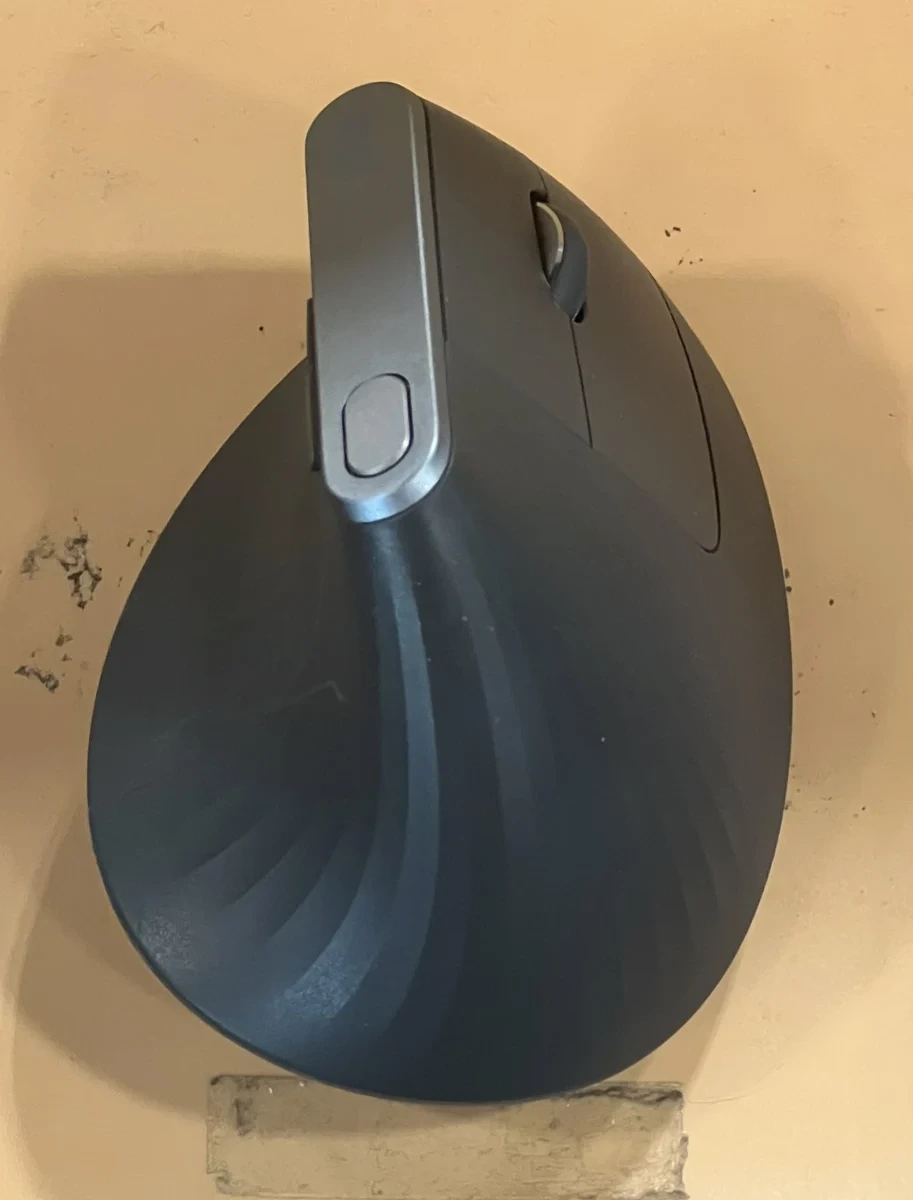
Logitech MX Vertical photographed from above, showing its tall angled body, scroll wheel and cursor-speed button.
Photo: TaurusEmerald / Wikimedia Commons, CC BY-SA 4.0. Resized and converted to WebP; this adapted image remains CC BY-SA 4.0. Source and license linked below. Not an ApexTrusted test unit.
Quick fit check

Find out if it fits your setup

Pick your answers. Each result is written from the sources cited in this review; it is not a personal assessment or a guarantee.

Dominant hand
Hand size
Primary setup
Matches the documented fit
  • Logitech makes the MX Vertical as a right-handed mouse.
  • Logitech positions the MX Vertical for medium to large hands.
  • A permanent desk is where the 78.5 mm tall upright body is easiest to live with.
See price & availability on Amazon Paid link. As an Amazon Associate I earn from qualifying purchases.
Worth a closer look?

The short verdict

Consider MX Vertical if you are right-handed, have medium-to-large hands and want to try an upright grip at your desk.

Try the shape or check return terms first. Small hands and left-handed use call for other options; an ergonomic label does not establish comfort or pain relief.

Why this verdict

Consider the MX Vertical if you use your right hand and want to try an upright mouse at a permanent workstation. Logitech positions it for medium to large hands. That is a starting point for a shortlist rather than proof that the shell will suit your grip.

The decision should turn on fit, button reach and your available connection. If you already work comfortably with a conventional mouse, there is no automatic reason to change. If your hand is small or you need a left-handed design, examine an alternative before ordering. We have not established that this mouse will relieve discomfort or improve anyone's health.

See price & availability on Amazon Paid link. As an Amazon Associate I earn from qualifying purchases.
  • 57°Upright angle (Logitech)
  • 135 gWeight (Logitech datasheet)
  • 3Connections: Bluetooth, Unifying receiver, cable
  • Up to 4 moBattery per charge (Logitech estimate)
A closer look

What matters before you buy

What makes it useful

A right-handed upright shape aimed at medium-to-large hands. Check button reach and packed height; the shape does not guarantee comfort or pain relief.

Read full analysis

Logitech describes a 57-degree upright shape intended to support a handshake-style grip. The practical question is whether you can reach the buttons naturally without changing the rest of your desk posture.

The manufacturer datasheet lists a right-handed body, 135 g weight and dimensions of 120 × 79 × 78.5 mm. That height deserves attention if your mouse normally travels in a shallow laptop compartment. Measure the pocket rather than relying on a photograph.

Try the shape where possible. A relaxed grip, desk height and arm position all matter to the experience, and this review cannot establish them remotely. The word “ergonomic” should not replace a personal fit check. No pain-reduction result is claimed here.
View source details

Will it work for you?

Supports Bluetooth, Unifying receiver and cable connections. Do not substitute a Bolt receiver; check ports and workplace software restrictions.

Read full analysis

The manufacturer documents Bluetooth, a Logitech Unifying receiver and a cable connection. Check which route your own computer permits before comparing optional software features.

This is not the same receiver family used by every Logitech mouse. The named receiver is Unifying; do not assume that an existing Bolt receiver will substitute for it. For a computer with only USB-C ports, inspect the supplied receiver connector and any adapter you would need.

The current US page refers to Options+ for customization, whereas the older datasheet refers to Logitech Options. Use the current support download for your operating system instead of treating an old PDF as a software installation guide. On a managed computer, ask IT about software and device restrictions first.

View source details

Costs & buying checks

Verify the included receiver, cable and return terms. Trying the shape matters more than relying on an ergonomic label.

Read full analysis

Compare the complete package and return conditions, not only the product name. Confirm seller, condition, included receiver and cable before evaluating the final delivered cost.

Logitech's datasheet states battery life of up to four months per full charge, dependent on use and computing conditions. This is a manufacturer estimate, not an endurance measurement from ApexTrusted. It should not be used as a promise for your working pattern.

A useful return window matters especially for a shape change. Check the terms applying to the selected Amazon offer rather than borrowing return or warranty promises from Logitech's own store. We publish no fixed price, discount or availability claim, and we have not measured long-term battery degradation or serviceability.

View source details

What else to consider

Investigate Lift for smaller hands or a left-handed version. MX Master 3S suits buyers who prefer a conventional sculpted mouse and extra scrolling controls.

Read full analysis

Logitech Lift is worth investigating for smaller hands or left-handed use. Its current US page describes small-to-medium hand sizing and a separate left-handed option.

MX Master 3S is a different alternative: a conventional sculpted desk mouse for buyers who prioritize document navigation and configurable controls over an upright grip. ApexTrusted has a separate source-based review of that model. Neither article is a head-to-head comfort or performance test.

Keeping your current mouse is also reasonable. Identify a specific problem you want to address before buying another device. If the concern is persistent discomfort, product marketing alone cannot explain its cause or establish the right solution. Choose on documented fit requirements and your actual experience, rather than assuming a more specialized shape is automatically better.

View source details

Key specs at a glance

Product
Logitech MX Vertical; verify selected offer
Orientation
Right-handed; medium-to-large hand positioning
Sensor
High-precision optical; manufacturer specification
Tracking range
400–4,000 DPI; manufacturer datasheet
Physical reference
135 g; 120 × 79 × 78.5 mm (L × W × H)
Connection
Bluetooth, Logitech Unifying receiver, cable
Customization
Current US page references Logi Options+; verify OS support
At a glance

Strengths and limitations

Strengths

  • Upright 57-degree design offers a distinct grip to try.
  • Manufacturer documents Bluetooth, Unifying receiver and cable connection options.
  • Cursor-speed adjustment and software customization are available.

Limitations

  • Right-handed design; Logitech positions it for medium-to-large hands.
  • Tall body needs more carrying space than a flat travel mouse.
  • Hand fit and comfort have not been independently tested here.
  • Unifying and Bolt should not be treated as interchangeable receiver families.

Other products we have researched in this category.

About this review

The MX Vertical is a different kind of purchase from a conventional office mouse. Its main proposition is the way you hold it, so a feature checklist cannot settle the decision. Start by asking whether you want to change your grip and whether you can try that change without giving up a useful return option.

This article is research by Tú Nguyễn using published manufacturer documentation, not a hands-on report. We have not assessed an individual's comfort, measured tracking or recorded long-term reliability. Our role here is to explain the buying tradeoffs and the questions the product pages do not answer for your particular desk.

Research method & limitations

Research checked October 26, 2026. The current Logitech US product page supplies positioning and current software references. The explicitly dated manufacturer datasheet supplies physical dimensions, tracking range, connection options and conditional battery information. The Amazon US destination was checked for the MX Vertical model name; it is not a source of independently tested performance.

We did not obtain or test a unit. We have no original evidence for comfort, noise, latency, sustained battery life or durability. We do not turn manufacturer ergonomic percentages into health advice or a claim that the product will work for every person. Editorial fit and purchasing guidance above is our interpretation of the documented differences.

The real product photograph is separately licensed from Wikimedia Commons and does not imply ownership, endorsement or testing by ApexTrusted. The Amazon button uses an ordinary untagged US link while affiliate configuration is inactive. Direct source and license links remain available below so readers can inspect the underlying material.

Check it yourself

Sources & references

  1. 1Logitech US — MX Vertical design, hand sizing and softwarelogitech.com
  2. 2Logitech — MX Vertical manufacturer datasheet (2021 document)logitech.com
  3. 3Logitech US — Lift sizing and left-handed optionlogitech.com
  4. 4Logitech — Options software and supported device tablelogitech.com
  5. 5Amazon US — MX Vertical, ASIN B07FNJB8TTamazon.com
  6. 6ApexTrusted — MX Master 3S research reviewapextrusted.com
  7. 7Photo source — TaurusEmerald, Logitech MX Vertical Ergonomic Mousecommons.wikimedia.org
  8. 8Photo and adapted image license — CC BY-SA 4.0creativecommons.org
Your next step

Does it fit your setup?

Compare the selected edition, included accessories and seller’s return terms before ordering.

See price & availability on Amazon Paid link. As an Amazon Associate I earn from qualifying purchases.

Privacy settings

Choose optional tracking below. Your choice is saved on this browser for up to six months. Change it anytime using Privacy settings in the footer.

Essential storage Always on

Security, forms and remembering your privacy choices. These do not require an optional tracking choice.

Cookie Policy · Privacy Policy